Laser engravers are cheaper now. Many makers want one. But the wrong laser source can ruin results and waste money.
Choose a laser source that matches your materials, power needs, stability goals, and budget. Blue diode and near-IR diode modules fit most consumer use cases. Fiber and CO₂ fit special tasks.

The laser source is the heart of the machine. It decides what you can engrave, how fast you work, and how consistent your output is. This guide keeps things simple and practical.
What laser source types fit desktop and consumer machines best?
Too many options cause confusion. People pay more than needed or pick the wrong wavelength. Both lead to frustration.
Most users choose diode lasers1 for size, cost, and easy setup. Fiber lasers2 target metals. CO₂ lasers3 target non-metals. Pick by use, not by hype.
Dive deeper
The core choices
- Diode (near-IR, 808–980 nm): Small, efficient, low cost. Good for wood, leather, many plastics, coated metals. Often fiber-coupled for stable beams.
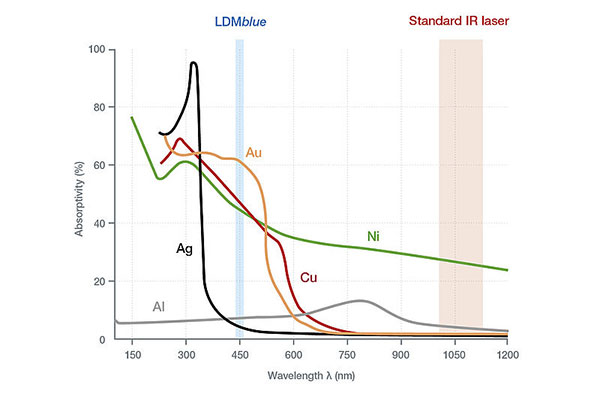
- Blue diode4 (≈450 nm): Higher metal surface absorption. Good for thin film marks and darkening on steel and anodized aluminum. Compact and popular in desktop gear.
- Fiber (1064 nm, pulsed or CW): Best for direct metal engraving and deep, fast marks. Higher price and larger power supply. Often not “desktop” unless in a dedicated head.
- CO₂ (10.6 µm): Great for acrylic, wood, paper, leather, fabric, and glass marking. Not good for bare metals without coatings. Bulky tube, needs airflow and often water cooling.
Quick comparison
| Type | Typical power | Best use | Notes |
|---|---|---|---|
| Near-IR diode | 5–40 W | Wood, plastics, leather | Small, efficient, easy to integrate |
| Blue diode4 | 5–30 W | Metal surface marks, transparent plastics | Better metal absorption, tight spots |
| Fiber 1064 | 20–50 W (desktop), 50 W+ | Metals, fast marking | Costly, precise, often pulsed |
| CO₂ 10.6 µm | 40–150 W | Acrylic, wood, paper, leather | Clean cuts, larger footprint |
Why diode often wins in consumer gear
Diode modules are compact, light, and energy-efficient. They fit small gantry frames. They can run on simple 24 V supplies. They offer enough power for hobby work and small business orders. Blue diode4 units add better coupling to metals, so they handle logos on knives, cups, and tags. If you sell many acrylic signs, CO₂ may be better. If you engrave tool steel all day, choose fiber. For most mixed materials and simple desks, diode is a strong first choice.
How do I match wavelength and material?
Wrong wavelength means slow speed, weak contrast, or no mark at all. People push power to compensate. Machines overhear. Quality drops.
Match the wavelength to the absorption of your material5. Blue for many metals and clear plastics. CO₂ for organic non-metals6. Near-IR for wood and many opaque plastics.
Dive deeper
Material vs. wavelength map
| Material | Best wavelength | Why | Result |
|---|---|---|---|
| Wood (birch, bamboo) | 808–980 nm or 10.6 µm | Strong absorption | Dark, high-contrast engraves |
| Acrylic (cast, clear) | 10.6 µm CO₂ | Very high absorption | Smooth cuts, glossy edges |
| Leather | 808–980 nm or 10.6 µm | Good absorption | Clean, dark marks |
| Paper, card | 10.6 µm CO₂ | Easy coupling | Crisp cutting with low power |
| Anodized aluminum | 450 nm or 1064 nm | Surface absorbs well | High-contrast marks |
| Stainless steel | 450 nm (mark), 1064 nm (deep) | Better metal absorption | Color/black marking or deep engraving |
| Brass, copper | 450 nm or 1064 nm (higher power) | Reflective metals | Use more power or coatings |
| Glass | 10.6 µm CO₂ (marking) | Micro-fracture at surface | Frosted marks |
| Transparent plastics | 450 nm | Better absorption than IR | Visible marks without dye |
Think absorption first, power second
You can raise power, slow the speed, or run many passes. But if the material does not absorb the wavelength, results stay poor. Start with the right wavelength and a focused beam. Then tune power, speed, and passes.
What about coatings and pastes?
Coatings help metals absorb non-ideal wavelengths. You can add a dark marking spray to stainless steel and engrave with a diode. It works, but it adds cost and steps. If you do this often, a fiber laser2 may save time.
Multi-material shops
If you engrave wood, leather, and some coated metals, a diode module covers most jobs. If you cut acrylic letters and signs, CO₂ rules. If your shop stamps serial numbers into steel parts, fiber pays off. Many small shops end up with two heads or two machines over time.
What specs matter most before you buy?
People chase big watt numbers. They ignore beam quality, wavelength control, or cooling. Jobs fail. Edges char. Lines blur.
Look beyond power. Check stability, beam quality, wavelength tightness, cooling, and driver control. These drive speed, contrast, and lifetime.

Dive deeper
The short list that really matters
- Stable output power7: Consistency means repeatable marks and fewer rejects during long runs.
- Beam quality and spot size8: A smaller, rounder spot gives finer detail. It also improves energy density, so you can run faster at the same power.
- Wavelength accuracy and spectral width9: Tight control helps with tricky plastics and sensitive processes. For some pumped systems, ±0.5–1 nm and narrow linewidth are best.
- Thermal design10: Good heat sinking and proper fans or water cooling keep power stable. Heat kills diodes and shifts wavelength.
- Driver quality: Clean current, fast modulation, and protection features prevent diode damage and improve grayscale control.
- Optics and fiber coupling: Quality lenses and robust fiber connectors reduce losses and keep alignment stable.
Practical targets
| Parameter | Good target | Why it helps |
|---|---|---|
| Output stability | ≥95% over long runs | Uniform color, depth, and line width |
| Wavelength tolerance | ±0.5–1 nm | Better material match, less drift |
| Spectral width | <1 nm (diode modules) | More consistent absorption |
| Fiber core size | 50–200 µm | Balance between fine spot and power |
| NA (numerical aperture) | 0.22 (common) | Predictable focus and depth |
| Cooling | Water for >30–40 W, good fans below | Maintains power and lifetime |
Do not forget safety and compliance
Proper housings, interlocks, and goggles matter. Check IEC/FDA compliance in your market. A stable module from a reputable vendor often includes clear specs, test data, and service paths. That saves time later.
How do I balance budget, reliability, and integration?
Many users buy cheap modules. Later they fight drift, early failures, and slow support. Downtime costs more than the savings.
Think total cost of ownership. Pay for stability, thermal design, and support. Pick a form factor that drops into your frame and electronics.
Dive deeper
Total cost over time
Price is not the only number. Consider:
- Yield: Stable lasers reduce scrap and rework.
- Uptime: Better cooling and drivers reduce shutdowns.
- Speed: A smaller spot and stable power raise throughput.
- Service: Fast replacements beat weeks of waiting.
A module that costs a bit more can pay for itself in a few months if you run daily jobs.
Integration checklist
- Form factor: Choose a compact, rugged housing that fits your gantry. Check weight and mounting holes.
- Electrical: Match supply voltage and current. Confirm connectors and pinouts. Look for enable pins and PWM/analog inputs.
- Control: Ensure the driver supports your controller’s PWM frequency and modulation depth. Smooth grayscale needs stable current control.
- Cooling path: Plan airflow or water lines. Keep intakes clear. Avoid recirculating hot air inside small enclosures.
- Optics access: Easy lens cleaning and focus adjustment save time. Dust kills beams.
Data you should ask for
Ask the vendor for burn-in data, life tests, and environmental tests. Look for shock, vibration, and thermal cycling results. Ask for long-run power plots at your planned current and temperature. Good vendors share this. It shows confidence and process control.
When to step up in class
If orders grow and you mark metals for hours each day, consider a pulsed fiber system. If acrylic cutting becomes your main job, invest in a quality CO₂ unit with strong exhaust and cooling. Start simple. Upgrade when your job mix proves the need.
A quick starter matrix for typical buyers?
Choice feels hard at first. A small table saves time and points you to the right shelf.
Pick the row that matches your work. Then use specs to size power and cooling. This prevents overspend and delays.
Dive deeper
Role-based picks
| User | Best first pick | Power | Why |
|---|---|---|---|
| Home hobbyist | Near-IR diode module | 5–10 W | Low cost, easy, safe to mount |
| Etsy studio | Blue diode module11 | 10–20 W | Dark metal marks + wood/plastic |
| School lab | Near-IR diode or CO₂ mini | 10–40 W | Simple, versatile projects |
| Sign shop | CO₂ gantry12 | 60–150 W | Fast acrylic and wood cutting |
| Tool shop | Pulsed fiber13 | 20–50 W | Clean, fast metal engraving |
Power sizing
Do not jump to the highest power. Start with the smallest module that meets your speed target. Double power does not always double speed. Beam quality and focus matter just as much. Also confirm your frame can move fast without wobble. A stable frame with a sharp spot often beats raw power.
Upgrades that matter
Add a better nozzle and air assist for cleaner edges. Use quality lenses and keep them clean. Add an enclosure with smoke extraction. Good fixtures hold parts steady and improve repeatability. Simple steps raise quality more than raw watts.
Recommended modules for consumer machines?
Most studios want strong marks on metals and clean detail on wood and plastics. Blue diodes solve both with one head.
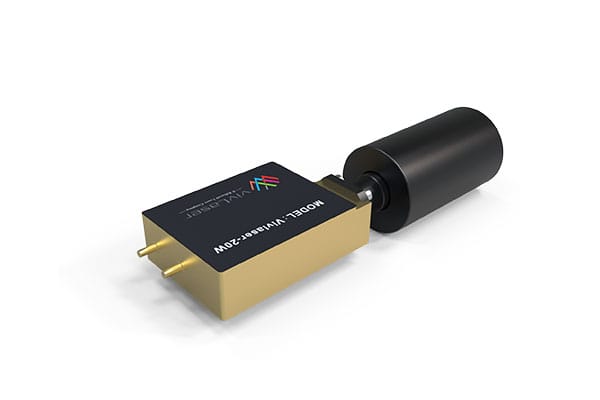
We recommend Vivlaser Blue Diode Laser Modules14 at 20 W and 40 W for desktop and small business use.

Dive deeper
Why these two options. The 20 W blue module is a great starter for makers, Etsy shops, and labs. It gives strong contrast on anodized aluminum, stainless tumblers, tools, and coated tags. It also engraves wood and dark plastics with sharp detail and low heat spread. The 40 W blue module suits higher throughput and deeper metal marks. It supports faster passes on larger logos and batch runs. Both modules keep a compact footprint, so they mount on common desktop gantries. They accept standard PWM control, which makes setup simple with typical hobby and light-industrial controllers.
What you gain. Stable output cuts rework. A fine, round spot improves small text, QR codes, and vector detail. Good thermal design keeps wavelength and power steady during long jobs. You also gain integration speed. The modules fit standard brackets and power rails. They come with responsive support and OEM/ODM options. That helps when you need a custom connector, a different cable length, or a specific lens.
Where they fit. If you sell custom cups, knives, key tags, or phone cases, start with 20 W. If you run longer daily batches or want deeper contrast on steel, step to 40 W. If your work shifts toward acrylic cutting, plan a CO₂ addition later. If you must deep-engrave tool steels every day, plan a pulsed fiber head. For most mixed consumer jobs, these two blue modules cover your needs with a simple, reliable setup.
Conclusion
Match wavelength to material first. Then choose stable power, good cooling, and a module that fits your frame.
-
Explore the benefits of diode lasers, including their compact size and cost-effectiveness, ideal for hobbyists and small businesses. ↩
-
Learn about fiber lasers’ precision and speed in metal engraving, making them a top choice for professionals. ↩ ↩
-
Discover the versatility of CO₂ lasers for various materials, perfect for crafting and industrial applications. ↩
-
Find out how blue diode lasers enhance metal marking with better absorption, ideal for detailed work. ↩ ↩ ↩
-
Understanding material absorption is crucial for achieving high-quality laser engravings and cuts. ↩
-
Explore how CO₂ lasers effectively interact with organic materials for optimal results. ↩
-
Understanding stable output power is crucial for ensuring consistent performance and reducing rejects in laser applications. ↩
-
Exploring beam quality and spot size can help you achieve finer details and improved energy efficiency in your projects. ↩
-
Wavelength accuracy is vital for working with sensitive materials, ensuring better results and fewer issues during processing. ↩
-
A good thermal design is essential for maintaining power stability and prolonging the lifespan of laser diodes. ↩
-
Explore the advantages of Blue diode modules for engraving, including their versatility and efficiency in marking various materials. ↩
-
Learn how CO₂ gantries operate and their effectiveness in cutting acrylic and wood quickly and accurately. ↩
-
Discover the applications of pulsed fiber lasers, especially in metal engraving, and how they enhance precision. ↩
-
Find out the features and benefits of Vivlaser Blue Diode Laser Modules for desktop and small business use. ↩